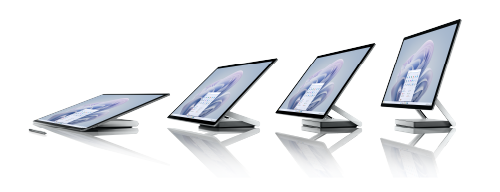
Use Microsoft Surface Studio 2+ to take your productivity and creativity to the next level with the versatile all-in-one. Let your ideas flow by easily adjusting the large 28” PixelSense™ touchscreen to any angle that lets you do your best work.
Get to know Surface Studio 2+
Not sure where to plug something in or how to turn up the volume? We've got you covered. Here are a few diagrams to help you.
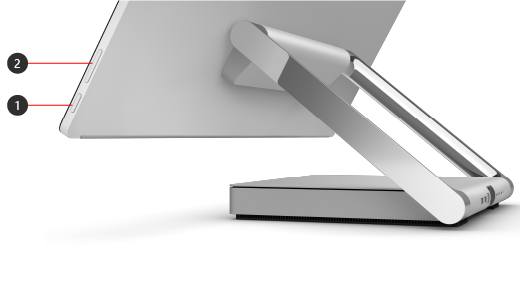
- Power
- Volume
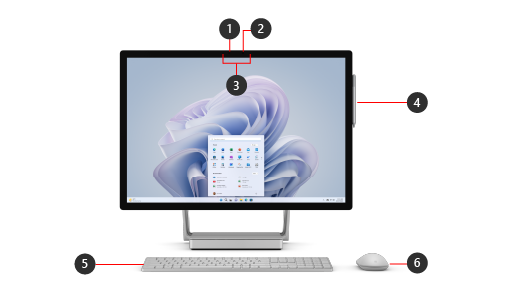
- Windows Hello facial-recognition camera
- Front-facing 1080p HD camera
- Dual far-field Studio Mics
- Surface Pen *
- Surface Keyboard *
- Surface Mouse *
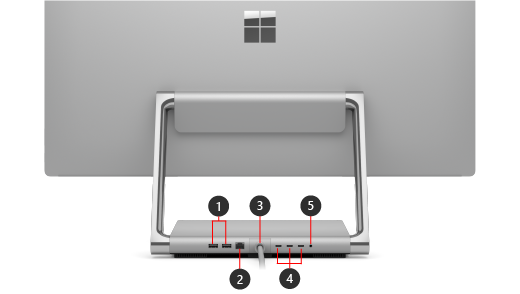
- USB-A port (2 ports)
- Ethernet port
- Power cord
- USB-C with Thunderbolt™ 4 (3 ports)
- Headphones jack
* Included in-box with Surface Studio 2+ in some countries/regions.
Windows 11
Surface Studio 2+ comes with Windows 11 Pro edition.
Highlighted Surface Studio 2+ features
- Be productive throughout your day on the brilliant and large 28" PixelSense™ touchscreen—lower and raise the display easily with the Zero Gravity Hinge to work your best at any angle.
- Multitask using the powerful 11th Gen Intel® Core™ H-35 processor. Make calls, edit photos and presentations, and tackle your other projects with confidence.
- The NVIDIA® GeForce RTX 3060 dGPU is built with the latest RT Cores, Tensor Cores, and streaming multiprocessors for great performance. Whether you’re drawing, editing photos, or taking a break to play the latest Xbox games when you have Xbox Game Pass Ultimate 1 and an Xbox controller 2 paired with it, you’re covered.
- Let your ideas flow on the immersive touchscreen with Surface Pen 3. Collaborate together or remotely on a digital whiteboard using touch or your pen.
- Connect with people on video calls on the large, crisp display with a 1080p HD camera and dual far-field Studio Mics that capture your voice clearly and reduce background noise.
- Surface Studio 2+ has a variety of ports, including USB-C with Thunderbolt™ 4. Transfer large files fast with an external hard drive and pair with a range of accessories.
- Enjoy spectacular picture quality with Dolby Vision® 4 and immersive cinematic sound with Dolby Atmos®.5
Note
Disclaimers
- Subscription required. Sold separately. Xbox Cloud Gaming (beta) requires Xbox Game Pass subscription: streaming limitations and wait times may apply. Select devices and regions. Game catalog varies over time.
- Sold separately.
- Surface Pen is included in-box with Surface Studio 2+ in some countries/regions.
- Requires Dolby Vision® encoded content and video.
- Requires Dolby Atmos® encoded content and audio.
Accessories
Use these optional accessories with Surface Studio 2+:
Get the most out of your Surface
Learn more about your Surface and customize it with the Surface app. To open it, select Start
 , enter Surface, and select it to open the app. If the app doesn't open, get it from Microsoft Store.
A more repairable device design
Many components can be replaced by authorized service providers or skilled technicians — supporting a more repairable device design. Replacement components are available for out-of-warranty repair. Availability and service options may vary by product, market, and over time.
To learn more, see Self-repair information for your Surface device.
Related topics
Need more help?
Technical support

For technical support, open the Surface app, describe your problem and select Get Help.
Community support

Communities can help you ask questions, and hear from experts with rich knowledge. Ask the Community.
Other support

If you can't use your Surface or have a question about something else, open Get Help to get other support online.