Get to know the Surface Laptop (8th Edition) and all the latest features and capabilities of a Copilot+ PC. Available as Surface Laptop, 13.8-inch and Surface Laptop, 15-inch.
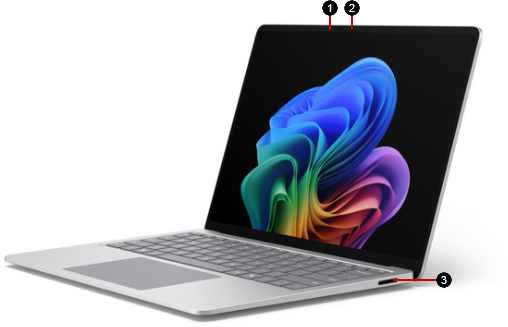
- Windows Hello camera
- Front-facing camera
- Surface Connect port
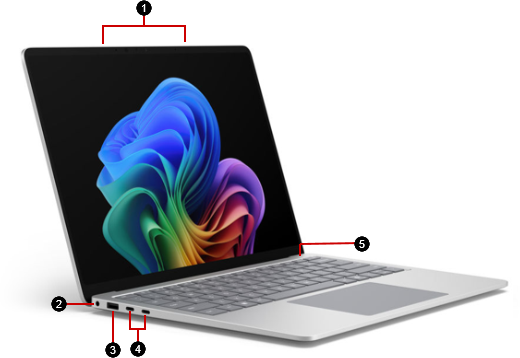
- Studio Mics
- Headphones jack
- USB-A port
- Two USB-C (USB4/Thunderbolt 4) ports
- Power button
Available to purchase from the Microsoft Store and other retailers.
Using the Privacy screen key
Select configurations of the Surface Laptop for Business (8th Edition) include a Privacy screen key [F1]. Press the key to reduce viewing angles. Learn more about the Privacy screen options.
A more repairable device design
Many components can be replaced by authorized service providers or skilled technicians — supporting a more repairable device design. Replacement components, such as laptop feet, are available for out-of-warranty repair. Availability and service options may vary by product, market, and over time.
To learn more, see Self-repair information for your Surface device.
Related topics
- Product safety warnings and instructions
- Surface regulatory information
- Warranty and Protection Plan Terms & Conditions
- Windows accessibility features
- Which edition of Windows comes with your Surface device?
Need more help?
Technical support

For technical support, open the Surface app, describe your problem and select Get Help.
Community support

Communities can help you ask questions, and hear from experts with rich knowledge. Ask the Community.
Other support

If you can't use your Surface or have a question about something else, open Get Help to get other support online.