
Important
Support for legacy Outlook for Mac will end in October 2026. Continued support for legacy Outlook for Mac will depend on your Microsoft 365, Office, or Outlook license. For more information, go to End of support for legacy Outlook for Mac.
Read receipts and delivery notifications are only available when using a Microsoft 365 work or school account, or an Exchange Server account managed by your organization.
Note
This feature isn't available for Outlook.com accounts, or for IMAP or POP accounts such as Gmail, Yahoo!, or iCloud.
Request a read receipt
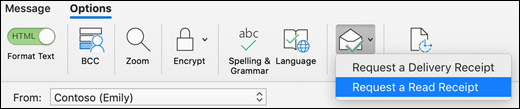
- In Outlook, compose your message.
- Select Receipts > Read Receipt.
- Send your message.
Request a delivery notification
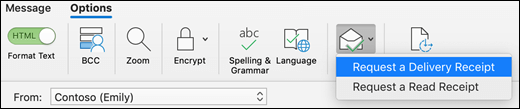
- In Outlook, compose your message.
- Select Receipts > Delivery Receipt.
- Send your message.
Note
If you don't have the Receipts button, you can customize your toolbar to add it. For more information, please go to Customize your toolbar in Outlook for Mac.
Related articles
Request a read receipt or delivery notification in Outlook for Windows
